🧬 BLAST - Using CMD! 🧬
Code

Description
🚀 Running BLAST from the Command Line
BLAST can also be executed directly through the command line (CMD or Terminal), which is faster and more flexible for batch processing. Below are the steps to install and run BLAST locally on Windows.
Step 1: Download BLAST+
- Go to the official NCBI BLAST+ download page: Download BLAST+
- Download the ZIP file for your operating system (e.g.,
win64for 64-bit Windows). - Extract the folder (e.g.,
ncbi-blast-2.x.x+) to a location such asC:\Program Files\BLAST+.
Step 2: Add BLAST+ to PATH
- Open System Properties → Environment Variables.
- Find Path, click Edit, and add the
binfolder inside your BLAST installation (e.g.,C:\Program Files\BLAST+\bin). - Open a new CMD window and check installation by typing:
blastn -version
Step 3: Prepare Query and Database
- Place your query file in FASTA format, e.g.,
query.fasta, inside your working directory. - If using a local database, format it first using
makeblastdb:makeblastdb -in my_sequences.fasta -dbtype nucl -out mydb - If using NCBI’s remote database, you can use
-db nt -remotedirectly. If you want to read about BLAST Read the full blog about BLAST →
And if you want to know everything about BLAST and not interested in reading then
 Watch BLAST Tutorial on YouTube
Command Explanation
Following is the explanation of a command to run BLAST using command prompt terminal> It also explains some alternatives options to get required results of BLAST.
blastn -query query.fasta -db nr -out results.txt -outfmt 6 -evalue 1e-5 -num_threads 4 -max_target_seqs 10 -word_size 11
Explanation:
This is a standard local BLASTn command comparing nucleotide sequences from query.fasta against a standard database nr, saving results in tabular format. It uses 4 CPU threads, shows the top 10 hits, and uses a default word size of 11 for nucleotide BLAST.
📝 Explanation
- 1. blastn
Chooses the BLAST program type.
Variants:
•blastn→ Nucleotide vs Nucleotide
•blastp→ Protein vs Protein
•blastx→ Translate nucleotide query → search protein db
•tblastn→ Protein query → search translated nucleotide db
•tblastx→ Translated nucleotide vs translated nucleotide - 2. -query query.fasta
Input file containing your query sequence(s) in FASTA format.
Alternative: Provide a full path or use-query -to paste sequences directly. - 3. -db mydb
Database against which you’re searching. Must be formatted withmakeblastdbif local.
Alternatives:
•-db ntor-db nrwith-remote→ Use NCBI’s databases.
•-subject subject.fasta→ Compare directly to a FASTA file. - 4. -out results.txt
File to save results.
Alternatives:
• Omit → results print directly in CMD.
• Redirect manually:> results.txt. - 5. -outfmt 6
Output format.
Common choices:
•0→ Pairwise (default, human-readable)
•5→ XML
•6→ Tabular
•7→ Tabular + comments
•10→ CSV
•11→ BLAST archive - 6. -evalue 1e-5
Expect value threshold (smaller = stricter).
Alternatives:
•-evalue 1e-10→ very strict.
•-evalue 10→ default, less strict. - 7. -num_threads 4
Number of CPU threads to use.
Default = 1. Use more if your system supports it. - 8. -max_target_seqs 10
Limit the number of hits shown per query.
Alternatives:
•1→ Only best hit.
•500→ Extensive results.
Default = 500. - 9. -word_size 11
Seed word length for finding matches.
Smaller = more sensitive but slower.
Common values:
• Nucleotide BLAST → default = 11, can reduce to 7 for short queries.
• Protein BLAST → default = 3.
⚡ Optional but Useful Parameters
-perc_identity 90→ Only report matches with ≥90% identity.-qcov_hsp_perc 80→ Require ≥80% query coverage per HSP.-task blastn→ Choose variant:
•blastn(default)
•blastn-short(short reads)
•megablast(fast, highly similar)
•dc-megablast(cross-species)-remote→ Run search on NCBI’s servers instead of locally.
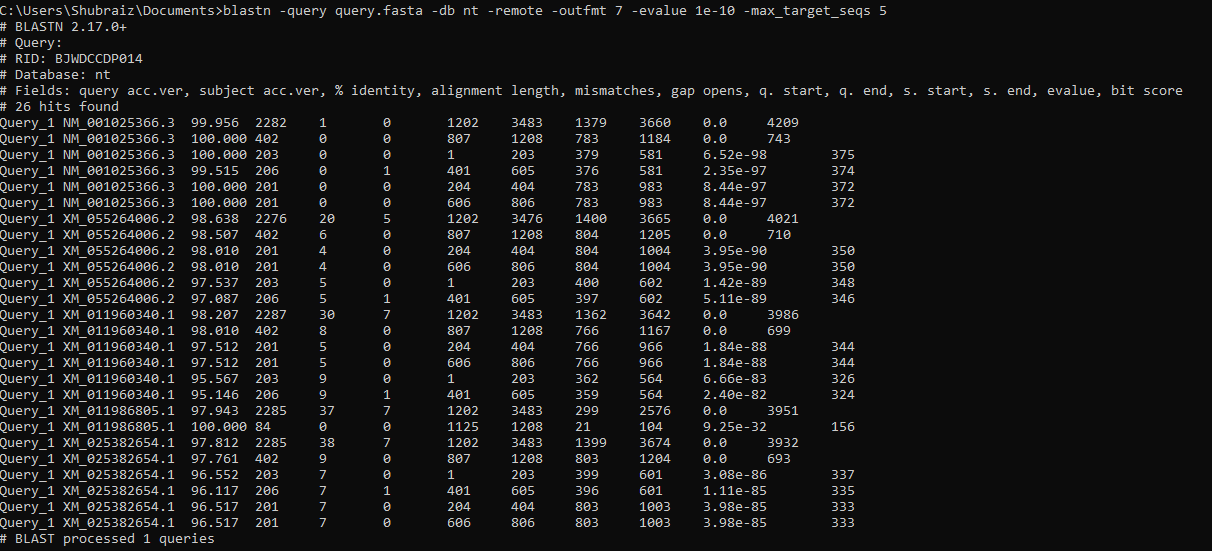
Output
The output below shows the BLAST results for the provided DNA sequence.
Note: Click on the pictue zoom in to get better view or you can download the image by using the button at the bottom of image.
Note: If you find any error in the code or have any suggestion please feel free to ask me on contact page or use following social media links to connet with me.
BLAST Command-Line Manual (NCBI)
For full details straight from NCBI, read the official BLAST+ command-line manual.
Open NCBI PDFSource: NCBI Bookshelf — BLAST® Command Line Applications User Manual.
🧬 Thank you for Visiting! 🧬