INTRODUCTION TO BLAST
A BEGINNER'S GUIDE
Published on: August 26, 2025
Have you ever noticed, whenever we see something new, our mind compares it with something. Just because it has no name for that thing, so it compares and anticipate that it looks like this or that and that's how you get an idea or perception about that thing. But when you're a bioinformatician or a researcher and playing with biological codes, you often come across unknown biological sequences and to get an idea about that sequence you compare it with already annotated sequences. In simple words, this comparison of biological sequences is called BLAST. This comparison is vital for any biological research whether you're working with genomic data or proteins. Finding sequence similarity is the backbone of many biological discoveries. So, to get more familiarity with BLAST. Let's dig into it.
What is BLAST?
The Basic Local Alignment Search Tool(BLAST) finds regions of local similarity between sequences. The program compares nucleotide or protein sequences to sequence databases and calculates the statistical significance of matches. BLAST can be used to infer functional and evolutionary relationships between sequences as well as help identify members of gene families.
In simple words: if you have a sequence and you want to know what is this, and does it look like something we already know?', BLAST is the go-to tool.
Why is BLAST Important?
BLAST is considered a lifeline in bioinformatics because:
- It helps identify unknown sequences by matching them with known genes/proteins.
- It provides insights into evolutionary relationships among species.
- It is essential in functional annotation of genomes.
- It is fast and efficient, making it suitable for both research labs and classrooms.
Without BLAST, modern genomics would feel like searching for a needle in a haystack blindly!
How Does BLAST Work Behind the Scenes?
BLAST (Basic Local Alignment Search Tool) uses specialized algorithms to quickly find regions of similarity between sequences. Instead of comparing every nucleotide or amino acid one by one, BLAST breaks sequences into shorter portions (called k-mers). These words are matched with database sequences, and potential matches are extended into longer alignments. To speed things up, BLAST applies heuristic techniques smart shortcuts that prioritize the most promising regions instead of exhaustively searching all possibilities. Under the hood, BLAST builds upon classic sequence alignment algorithms like the Smith Waterman algorithm (for local alignment) and the Needleman Wunsch algorithm (for global alignment), but adapts them in a way that makes the search much faster without losing reliability.
Think of it like finding a quotation in a large book: instead of reading every page from start to finish, you first look for a few unique words, then scan around them to locate the whole sentence. In the same way, BLAST focuses on short sequence words first and then extends the match, making it both fast and reliable.
Types of BLAST
Depending on the type of sequence you're working with, BLAST offers several versions:
BLAST Table
| Type | Query vs Database | Functions (default in bold) |
|---|---|---|
| blastn (Nucleotide BLAST) | Nucleotide vs Nucleotide |
Megablast: sequence identification, intra-species comparison Discontiguous megablast: cross-species comparison, searching with coding sequences blastn: searching with shorter queries, cross-species comparison |
| blastp (Protein BLAST) | Protein vs Protein |
blastp: general sequence identification and similarity searches Quick BLASTP: with a k-mer match to accelerate search speed for very similar proteins DELTA-BLAST: protein similarity search with higher sensitivity than blastp PSI-BLAST: iterative search using PSSM to identify distant relatives in a protein family PHI-BLAST: protein alignment with input pattern as anchor/constraint |
| blastx | Nucleotide (translated) vs Protein | blastx: identifying potential protein products encoded by a nucleotide query |
| tblastn | Protein vs Nucleotide (translated) | tblastn: identifying database sequences encoding proteins similar to the query |
| tblastx | Nucleotide (translated) vs Nucleotide (translated) | tblastx: identifying nucleotide sequences similar to the query based on coding potential |
Methods to Run BLAST
There are multiple ways to run BLAST depending on your needs and expertise level:
-
NCBI BLAST Webpage
The most common and beginner-friendly method. NCBI provides an easy-to-use interface where you paste/upload your sequence and get results instantly.
- Other Online Platforms
-
EBI (European Bioinformatics Institute) also offers a BLAST service.
-
Some specialized databases (like UniProt and Ensembl) provide BLAST within their own systems.
-
Biopython
For coders, BLAST can be automated and integrated into Python scripts using Biopython. We've already covered this in detail, you can find its find its code and explantion here: BLAST Using Python →
-
Command-line BLAST
This is the most powerful and flexible option. It allows you to create local databases, analyze large datasets, and automate searches. But it is not easy for a beginner. You can learn it here: BLAST Using Command Line →
How to Run BLAST Using NCBI (Step-by-Step)
Here's the simplest way to know about known biological sequence:
-
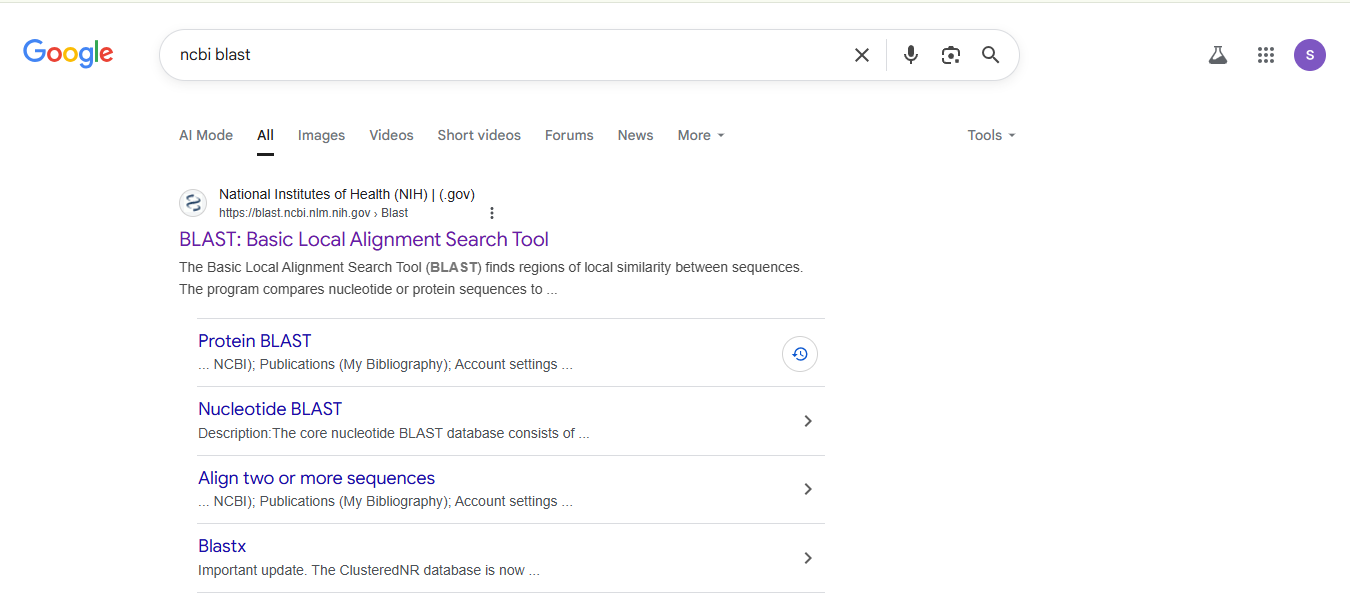
Go directly to the NCBI BLAST webpage or simply search NCBI BLAST in your internet browser and from search result select the following:
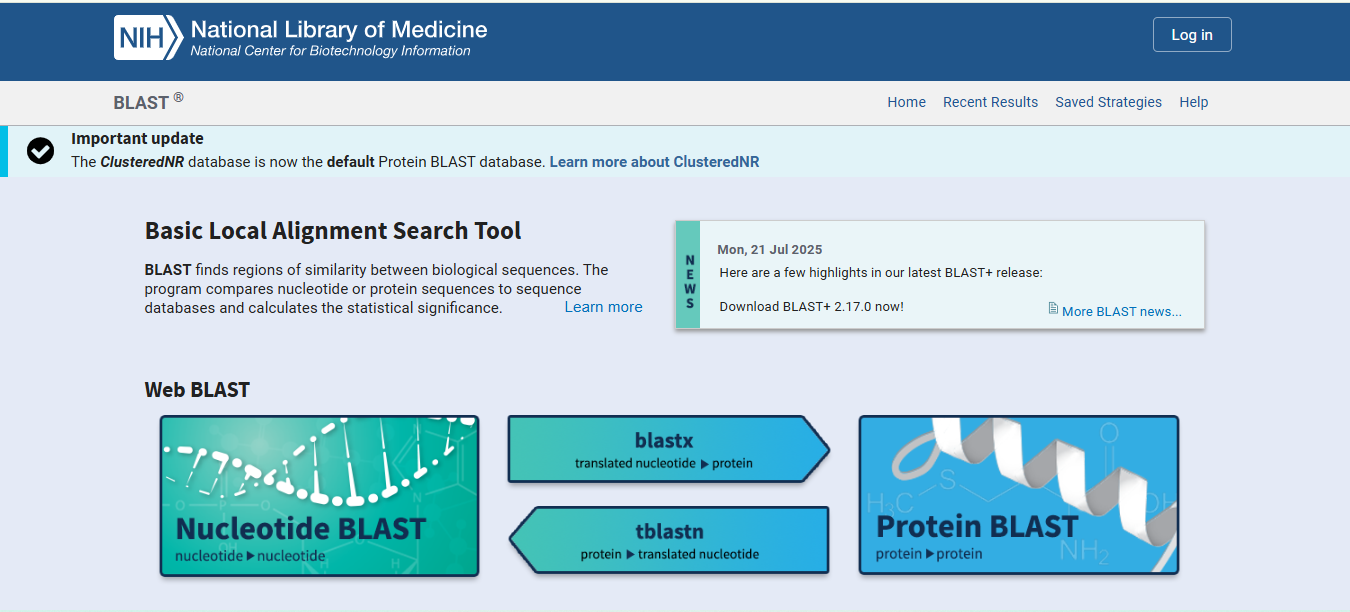
Choose the appropriate BLAST program (BLASTn BLASTp, etc.) by clicking on it.
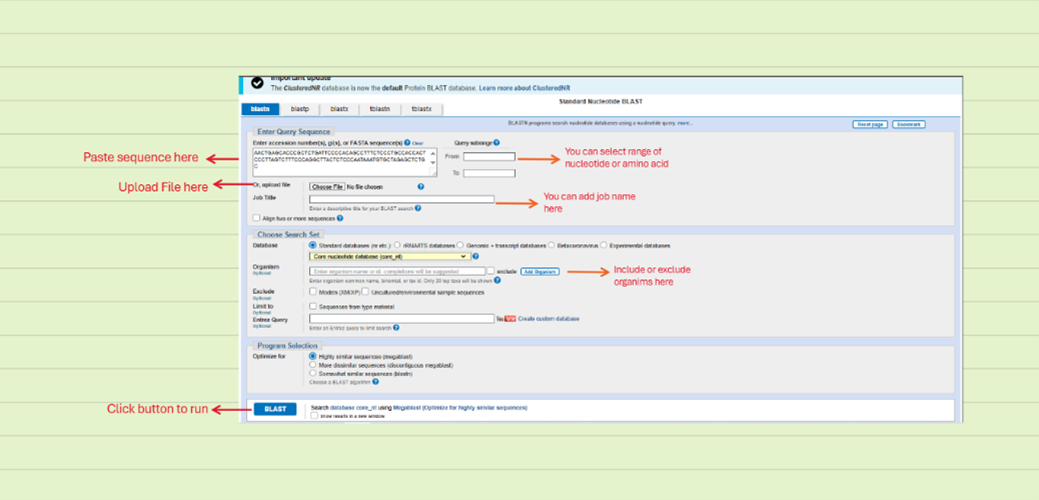
Paste your sequence upload sequence file (check the required formats first) into the search box or upload a file.
Select a database (e.g., nr for non-redundant database) and organism. This step is according to your choice and project.
Click BLAST and wait for results.
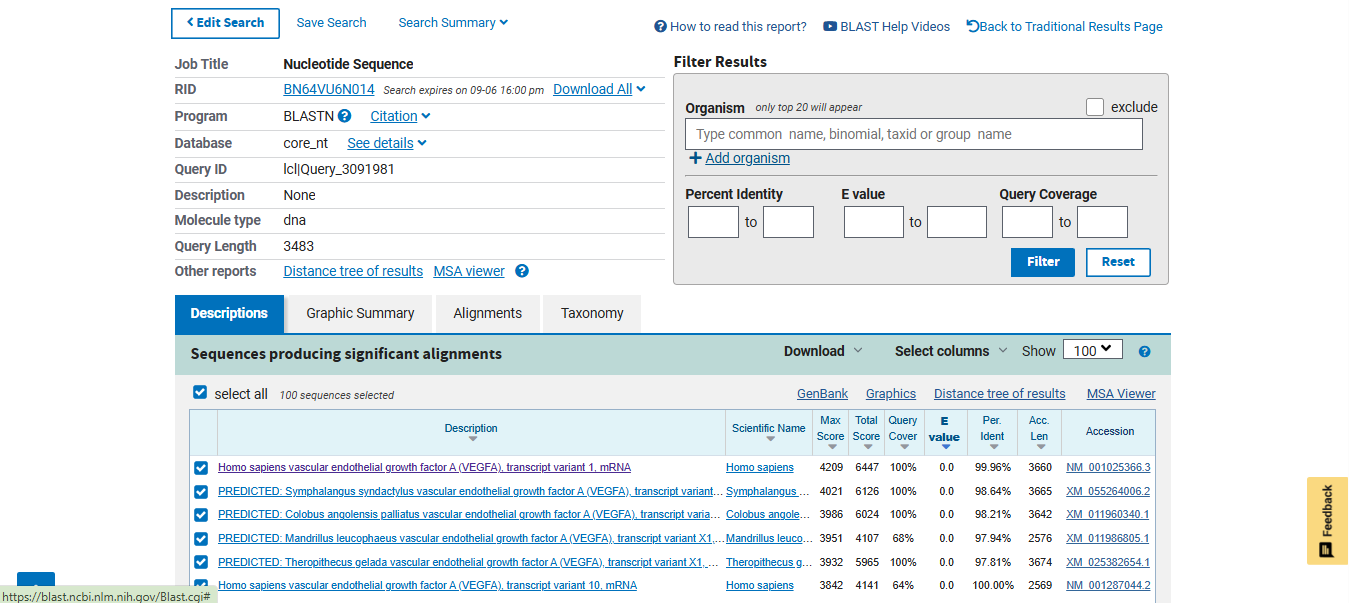
Interpret the query results, e-values, and similarities.
Note: To learn about the interpretation of these results you can also watch my video tutorial by clicking here: EVERYTHING ABOUT BLAST or visit my YouTube channel.
Conclusion:
BLAST isnot just a tool it is a gateway into understanding biology at the sequence level. From identifying unknown sequences to exploring evolutionary history, its applications are endless.
If you're new, start with the NCBI web version and practice. As you grow, you can move towards Biopython and command-line BLAST for advanced research projects.
For visual learners, I recommend checking out my YouTube tutorials where BLAST runs are explained step by step. It's often easier to learn when you see it in action.
If you have any questions or need further clarification, feel free to leave a comment below or reach out to me via the contact page. I'm here to help you on your bioinformatics journey!
Remember, like any tool, the more you use BLAST, the more proficient you'll become.
🧬 HAPPY BLASTING! 🧬